Introduction: How I Discovered SEO by Accident
When I first started blogging, I thought great content alone would attract readers. I spent hours writing posts and sharing them everywhere, yet traffic barely moved. It was only after I began learning the basics of SEO that things finally clicked, especially for beginners like me who just wanted their blog to be seen.
It sounded pretty technical back then, but it completely changed the way I experienced blogging.
Today, I’m going to break down SEO basics for beginners in a simple, storytelling way — no jargon, no confusion. By the end, you’ll know exactly how it works and how to rank on Google, even if you’re new or doing SEO for free.
Also Read: Digital Marketing for Beginners: Learn Digital Marketing for Free– it covers all major channels, including SEO, content marketing, and social media.
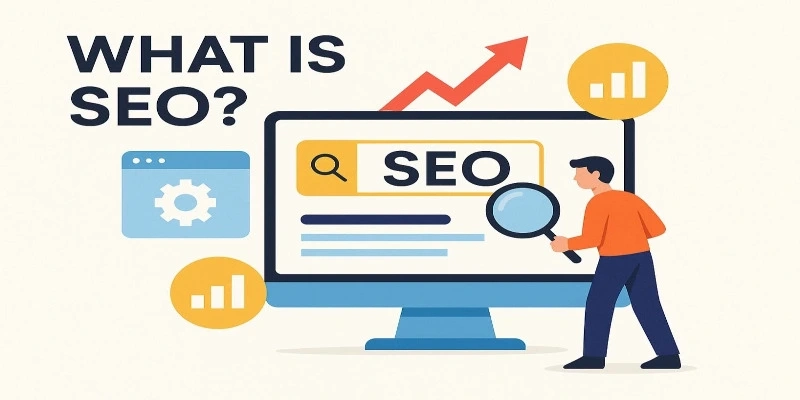
What is SEO?
Imagine Google as a matchmaker between your website and people searching for answers. SEO helps your content become the best possible match.
Every SEO journey starts by learning the basics designed for a beginner who wants to stand out among millions of websites.
In plain terms, SEO is ensuring that your content and site are optimized in a way that makes search engines grasp it quickly and present it to individuals looking for your subject.
It’s the connection between your blog and your audience. Without SEO, even the most awesome content can remain invisible.
Why SEO is Important (Even for Small Businesses)
Imagine SEO as having a shop on the most crowded street rather than a secluded alley. You want to be discovered — and SEO facilitates that.
Here’s why it’s important:
Free Organic Traffic: SEO sends visitors without the cost of advertisement. After your content is ranked, you continue to get people to your site month by month.
Gains Trust: Top-ranking content builds trust by default. When others catch a glimpse of you on page one of Google, they naturally assume you’re an authority and trusted source.
Persists Over Time: Unlike paid advertisements that lose their ability the instant you discontinue payments, SEO is long-lasting. When you rank, you will keep on getting visitors for months or even years.
Ideal for Small Businesses: Even if you can’t afford to pay for advertisements like large companies, it gets your site seen in local searches and establishes brand awareness.
“According to a BrightEdge study, organic search drives approximately 53% of all website traffic – more than social media and paid ads combined (BrightEdge, 2019).”
That means SEO isn’t just a technical trick – it’s a long-term investment in visibility and credibility that continues to drive results long after you’ve published your content.
How SEO Works: A Step-by-Step SEO Guide for Beginners
SEO can be complex-sounding, but it simply just comes down to five easy steps. Let’s walk through each one – beginner-style.
This section is designed to explain SEO basics for beginners clearly, showing that SEO success is all about mastering a few simple actions done consistently.
Step 1: Find the Right Keywords
Keywords are the terms people search on Google. For instance, when someone searches for “SEO tips for beginners” and want content that simplifies the topic of SEO.
Selecting good keywords is similar to selecting a good fishing location. You might have the best bait possible, but if you’re fishing where there are no fish, then you’ll catch nothing.
Here’s what you do:
- Use Ubersuggest or Google Keyword Planner to find low-competition keywords.
- Focus on long-tail keywords (3+ words), easier to rank for and bring more targeted audiences.
- Understand the search intent behind each query – are individuals seeking to learn, purchase, or compare?
- Verify the search volume to ensure that users are, in fact, searching for your target words.
If you’re just starting out, it’s better to target smaller, niche topics like “Simple SEO checklist” or “On-page SEO basics.”
Learning the basics of SEO taught me that for beginners, consistency and keywords matter more than perfection.
Pro Tip: Instead of going after “chicken recipes” (highly competitive), go after “easy chicken recipe for beginners” (specific and attainable).
Step 2: Optimize Your Content (On-Page SEO Basics)
On-page SEO helps search engines recognize the value of your content and ensures readers can easily follow along. Here’s how to do it effectively:
- Place your main keyword naturally in the title tag and at the beginning of your introduction (preferably in the first 100 words).
- Use related words or phrases in your subheadings to reinforce the topic.
- Keep paragraphs short and easy to read.
- Add internal links to your other articles (such as linking similar topics) and a few external links to trusted references.
- Give every image an alt text description that explains what it shows.
- Write a good meta description (that little summary you view beneath the title in search engine results) to enhance click-through rates
- Utilize header tags (H1, H2, H3) correctly to organize your content in a logical manner
Example:
If your post is about “how SEO works,” use variations such as “SEO basics explained” and “step-by-step guide to SEO.”
Don’t overthink— write naturally first, then come again and optimise. Your writing should be for people but still be SEO-friendly.
Step 3: Write High-Quality Content
Google appreciates problem-solving valuable content. So write for people initially, not algorithms.
Good content quality does not mean long post— it’s measured by how effectively you respond to the question the searcher has and keep them interested.
To make your posts appealing:
- Use stories and anecdotes humans remember it much.
- Add visuals such as infographics or screenshots.
- Subdivide each idea with subheadings so that readers can scan and locate what they are looking for.
- Incorporate action steps that people can apply immediately.
- Regularly update with new information, updated statistics, or better examples.
Step 4: Establish Authority (Off-Page SEO)
It’s now time to show that your website is worthy of a place in the rankings. This occurs via backlinks, links from other sites to yours.
Think of backlinks as credibility signals – when trusted websites link to yours, it tells search engines your content is valuable.
How to create backlinks (free):
- Write guest posts for niche blogs and mention a natural link to your site.
- Share useful insights on professional platforms like LinkedIn, Medium, or related forums.
- Submit your site to reputable directories(don’t spam).
- Create unique resources that others find valuable enough to reference.
Always remember Quality over quantity is what you should focus. A single link from a quality site in your niche is better than 100 links from random, low-value sites.
Learn more about backlinks in this Backlinko Guide.
Step 5: Learn the Technical SEO Fundamentals
Don’t be afraid. You don’t need to code for this, just ensure your website is clean and accessible to users and search engines.
Check these technical SEO fundamentals:
- Make your website mobile-friendly – more than 60% of searches now occur on mobile phones.
- Optimize page loading speed (use Google Page Speed Insights).
- Secure your website with HTTPS.
- Submit your sitemap to Google Search Console so Google can crawl and index all your pages easily.
- Repair broken links on a daily basis using tools like Broken Link Checker
- Build a site structure with easy navigation
- Use descriptive URLs like
digibeginner.in/learn-digital-marketing-for-free-a-beginners-guideinstead ofdigibeginner.in/?p=12345. Descriptive URLs help users and search engines understand what the page is about.
Most of them can be managed by your website platform (such as WordPress) or basic plugins. You don’t have to create from scratch – you have to ensure all the things are in place.
Now that you know the technical basics of SEO, the next step is learning digital marketing in depth.

Ready to Learn More About Digital Marketing?
How to Do SEO for Free
Here’s the best part: you can begin doing SEO today without spending a rupee. With the right free tools and a little consistency, you can start improving from day one.
Google Search Console – Discover which search terms lead people to your site.
Ubersuggest (Free Plan) – Explore keyword ideas and competition levels.
AnswerThePublic – See what real questions users are asking around your topic.
Yoast SEO Plugin – Get writing and readability suggestions as you create posts.
Google Analytics – Track who visits your site, what they read, and how long they stay.
Google Keyword Planner – Conduct keyword research from Google’s own information.
Canva – Design beautiful images and infographics without paying a rupee.
Combine these free tools and you’ll be doing SEO like a pro – with zero cost. Even a little grasp of the basics of SEO helps, especially for beginners who are just figuring things out.
Case Study: How a Small Blogger Ranked in 60 Days Using Basic SEO
Let’s make this real.
A tiny home-based baker named Tina started a food blog with passion but she has limited resources. She has high competition in her niche. But she was clever, she started targeting long-tail keywords like “easy cupcake recipes” and “best frosting for beginners.”
She took the very same step-by-step SEO process:
- Conducted extensive keyword research with free tools
- Optimized every post with proper on-page SEO
- Wrote informative, necessary content in step-by-step format with pictures
- Guest blogged on two small food blogs to create backlinks
- Published regularly — one good post each week
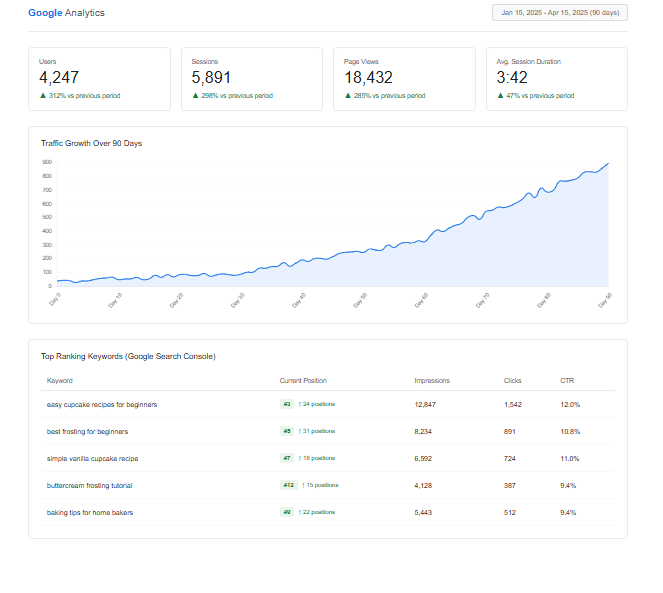
In only 90 days, her blog was ranked on page 1 for three keywords, and her traffic increased by 312% without spending on advertising.
That’s the magic of beginner SEO tips and following the basic tips and sticking to the basics consistently. Tina did not have any special skills or large budget – she dedicated herself to learning and implementing SEO fundamentals.
Before you start applying these tips, it’s equally important to know what mistakes to avoid. Even small SEO errors can slow down your progress and affect your rankings.
Basic SEO Mistakes Beginners Should Avoid
Knowing what to avoid is just as important as knowing what to do:
- Keyword stuffing – Placing your target keyword frequently makes the reading experience very robotic, and it might even damage your rankings. Write organically and place your keywords naturally throughout the blog.
- Omitting meta descriptions – They don’t influence rankings directly, but they influence if people click on your result. Always create good meta descriptions.
- Omitting internal links – those connections to your own related posts or pages — makes it harder for Google to understand your site’s structure and can cause visitors to leave sooner.
- Not monitoring performance – Not measuring performance with Google Analytics and Search Console leaves you behind. Always monitor what works.
- Expecting instant results — SEO takes time, and giving up too soon often means quitting right before things start to pay off.
Remember — success with SEO is the result of consistency and clarity, not shortcuts.
Frequently Asked Question
Is SEO easy to learn?
Yes! It only requires practice and patience. Begin with simple things, then gradually build up.
How long does SEO take to work?
Typically 3–6 months, depending on competition and consistency. Don’t worry if you don’t notice results in week one.
Can I do SEO for free?
Absolutely — use the free tools listed above. Paid tools just speed up the process and give more information, but they’re not necessary.
Is SEO essential for small businesses?
Absolutely. It makes small businesses compete with larger brands. Local SEO particularly makes small businesses to be discovered by local customers.
How frequently should I update my content?
Update your most effective posts every 3–6 months or whenever you find new information, new tools, or trends. Google favors fresh, updated content.
Do I need to hire an SEO expert?
Absolutely. It makes small businesses compete with larger brands. Local SEO particularly makes small businesses to be discovered by local customers.
Your SEO Journey Starts Here
SEO may seem overwhelming at the beginning, but having the right map, it’s completely achievable. The basics of SEO can make all the difference for beginners trying to grow their blogs from scratch.
Begin with keywords, optimize your posts, provide value, and monitor your growth.
Remember: Every pro SEO was once a beginner who did not know anything. The difference between them and the person who never makes it? They continued learning and didn’t quit.
One step at a time. Learn keywords this week. Optimize on-page next week. Get your first backlink the week following. Next thing you know, you’re going to see your first page-one ranking — and believe me, that feeling is awesome.